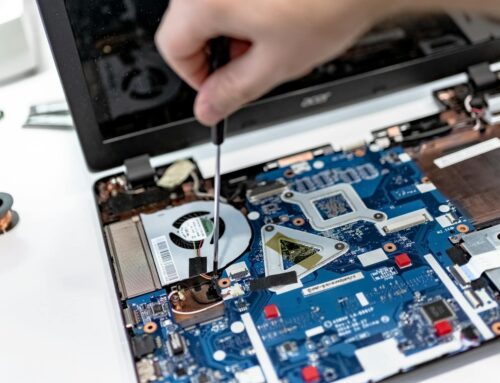
Spring thaw in London, Ontario, can be a mixed blessing. After months of snow and freezing weather, warmer air finally starts to move in. Along with it comes melting snow, muddy walkways, and damp corners in homes and offices. What some people don’t realise is this sudden temperature change and moisture can quietly affect laptops, desktops, and Macs. Machines that survived winter just fine might suddenly show strange behaviour as the thaw sets in. That’s when London, Ontario, computer repair requests tend to pick up, and not without reason. When the seasons shift, electronics need attention too.
Common Computer Problems Caused by Spring Thaw
Computers don’t love quick temperature jumps or indoor dampness. During the early part of spring, that combination is very common across homes and offices.
- Moisture in the air can collect around vents, ports, and fans. If a laptop or desktop sits near doors, radiators, or windows, it’s exposed to changes between indoor heating and cool outdoor air. That shift leads to condensation inside the device, which can short out parts over time.
- Power problems also tend to show up. Computers that kept a full charge all winter might struggle now. Batteries may drain faster. Some machines may even switch off on their own soon after booting.
- Another thing we often see is performance slowdowns or loud fan movement. If dust built up over the colder months, that mix of debris and moisture works into tight corners. The machine then works harder to stay cool, which produces heat and sound.
In spring, these issues start as little problems but can grow into bigger ones as changing temperatures linger week after week. Sometimes, computers that were rarely used in winter begin to see more activity, which can reveal dust or moisture hidden during months of lower use. The increase in foot traffic, open windows, and carried-in moisture all add to the odds that you’ll notice the machine acting differently from when it was sitting mostly idle through cold days.
Signs It’s Time to Get Help
Not every cold-weather computer hiccup is serious. Still, some signs point to more than just temporary lag or a missed update.
- If your computer doesn’t turn on when it usually would, or shuts off randomly without warning, that’s a red flag. There might be internal moisture or a short starting to form.
- Another trouble sign is a screen that goes dark or flickers after being left in a cold space. People often leave laptops in cars overnight, then power them on right away indoors. Those sudden shifts can stress the screen or backlight.
- Sticky keys or slow trackpads may be caused by dampness in the keyboard area. Even carrying a laptop inside a damp backpack or setting it near melted snow can cause this.
Some users hope these signs are software-related, but if they keep happening or appear just after the seasons change, they can suggest real hardware issues. Intermittent shutdowns in particular can be a warning that more serious damage is coming, especially if matched with a burning smell or unusual noises from inside the computer. When there is repeated lag, unresponsive apps, or peripherals like USB mice not connecting, it points to problems that need more than a quick restart.
It’s not always easy to tell whether these are hardware or software problems. But if you find yourself troubleshooting the same issue over several days, instead of things improving, it’s often a signal that a technician should check things out.
Why Waiting Can Make It Worse
Spring is often a busy season for repair, mostly because people hope the problem will pass on its own. Unfortunately, most of the time it doesn’t.
- Moisture trapped inside electronics doesn’t just dry out and leave. It tends to linger, causing slow corrosion of internal parts. Even parts that seem to work now might fail in the weeks after exposure.
- Short-term fixes like forced reboots or borrowing a charger might get the machine running again, but they can hide deeper issues. What looks like an app crash may actually be hardware starting to slip.
- The longer a computer with water or temperature trouble sits, the more damage sets in. That can lead to greater repair needs just before summer heat arrives, which puts stress on power systems and batteries again.
Dust and moisture mix together, making electronics even more sensitive. Over time, corrosion from damp air can ruin connections and chips. This silent damage won’t reverse itself, and it’s often much more costly to repair once it’s advanced. Acting early helps avoid all of this. If it feels like something’s wrong, there’s a reason.
When to Bring It in vs When to Call
Knowing when to stop troubleshooting and get help saves a lot of frustration. Sometimes, the best action is to step back and get a proper check.
- Bring the computer in if you see any kind of moisture around the screen, ports, or battery area. Watermarks, smearing on the screen, or missed keystrokes after the device has been near melting snow are all signs of something deeper. Freezing ports or slow charging at room temperature are another clue.
- If your machine seems fine on the outside, but your apps freeze up, run slow, or don’t open normally, it can help to call first. Sudden behaviour like this right after a thaw may not need physical repair, but it’s still worth checking.
- It also helps to think about how your setup is placed. If your computer is located near a door, under a leaky window, or on a floor that gets damp during snowmelt, look for repositioning options or cover it during the wet weeks.
Taking note of odd behaviour as soon as you see it, and reaching out with clear questions and signs, helps repair shops diagnose problems faster.
What Makes Spring Repairs Trickier Than Other Seasons
Spring tech problems come with their own timing punch. While it may feel like another season passing by, the tail end of winter tends to pile up small issues that surface all at once.
- Many parts still ship slower during the first few weeks of spring. That’s when supply lines play catch-up from cold-weather slowdowns.
- On top of that, machines rarely have a single problem. What looks like leftover battery trouble from winter might actually mix with new water damage from thawing conditions. That overlap takes longer to test and fix.
- The other issue is repeat damage. In spring, melted snow and filled-up gutters often make indoor spaces damp again and again. Computers kept in basements, near front doors, or by radiators face repeat moisture exposure. Even small spills or damp cloths used for cleaning can quietly make their way into vents and seams.
These overlapping issues make spring repairs a bit more involved, but also more important to do properly. Carefully cleaning out vents and checking for corrosion means every little detail counts. Even if a computer only shows a single odd behaviour, spring is the time when that small thing can mask more than one problem stacked together. This makes a technician’s careful inspection even more valuable, as it can reveal and fix problems before they combine and cause major breakdowns.
Details Make All the Difference in Spring Repairs
Our team has seen that detailed inspections matter much more during spring thaw than other times of year. We don’t just look for physical damage but also run checks on internal corrosion, fans, boards, and even battery contacts. Forest City Computer Repairs offers proper cleaning, dust removal, and motherboard checks as listed on our service page, which reduces the risk of missed seasonal moisture damage. We apply step-by-step diagnostics that spot tiny changes before they become bigger faults, especially after devices have gone through weeks of colder and wetter weather.
Keeping an eye on desktops, Macs, and laptops for condensation, flickering, or sluggish behaviour after the thaw can mean the difference between a simple repair and major downtime. We notice a clear increase in issues with USB ports, graphics, and power delivery in the weeks following the start of spring each year. Early attention stops the cycle before more damage takes hold. Even something as simple as checking battery terminals and making sure no green corrosion is present can keep devices running smoothly until summer.
Doing things with care, from cleaning dust out of fans to making sure connections are solid, helps prevent repeat trips to the workshop when spring is unpredictable. Devices move more at this time of year, from school to home or work, and this added movement makes existing problems show up sooner.
Keep Repairs Simple by Acting Early
Machines don’t always act up when we expect. Just because a laptop made it through winter without problems doesn’t mean it won’t start showing signs now. Cold weather stress, small bumps, and hidden moisture build-up can all come to the surface in the early weeks of spring.
By watching for signs like flickering screens, strange power behaviour, or keys that stop working after each thaw, we catch issues before they grow. Spring moves slow in London, Ontario. Thaw, freeze, then thaw again. That back and forth has effects on computers too. Acting early leaves more room to make repairs without rushing or stacking on added damage down the line.
When your computer starts acting up as temperatures rise, whether it’s sudden power drops, flickering screens, or unexpected fan noise, these may be early signs of issues caused by damp spring air or changing weather. We’ve helped many people in London, Ontario, diagnose and prevent damage before the summer heat sets in. For straightforward support with any computer problems, see our page on London, Ontario computer repair or give Forest City Computer Repairs a call so we can take a proper look.