Easter weekend often brings lighter schedules and quiet time at home, but it also means reduced shop hours across London, Ontario. If your PC gives you trouble during the holiday, you might find yourself stuck without an easy fix. Computers don’t always wait for a convenient time to fail. Whether the issue is a frozen screen, apps that won’t open, or a machine that won’t even turn on, it can stop your plans in their tracks.
If you’re searching for PC repair in London during Easter, it helps to know what might be going wrong, how to make the most of your time while help is limited, and ways to prevent damage from getting worse.
Common Springtime PC Issues You Might Notice
Early spring sees warmer indoor temperatures, which often affect how computers behave. After months of closed windows and lots of home use, machines start to show signs of strain that weren’t noticeable before.
- Sudden shutdowns can start showing up as internal parts heat up more quickly. Dust buildup around fans and vents from winter use only adds to the problem.
- You might hear fans working overtime. A loud fan often means the machine is running hot or the fan itself is struggling to push enough air through.
- If your PC feels slower than normal, it might be due to partial or missed system updates building up over recent months. Slower hard drives or weakening memory can make a PC lag or stall even under normal use.
These problems tend to surface all at once this time of year. What looked like a working computer in January can become one big slowdown by early April.
What to Check Before You Panic
Sometimes, what looks like a major issue can be something small. Before assuming your PC needs formal repair, there are a few basic things to check first.
- Make sure everything is plugged in properly. It sounds obvious, but loose wires and turned-off surge protectors are more common than you’d expect.
- Restart the machine in Safe Mode if you can. This loads up only the basic functions and can help show if the issue is linked to outside software.
- Remove anything connected to your machine that isn’t needed for basic startup. Items like USB drives, wireless mice, docking stations or headphones can sometimes interfere with the boot process if one of them has a fault.
It’s worth going through these steps before deciding that nothing can be done. Even if it doesn’t solve the problem, it gives you more insight into what might be wrong.
Why Easter Can Make Repairs Tricky
The main challenge at Easter is timing. Shops in London, Ontario often have limited hours or close completely over long weekends. That can mean delays, especially if you were hoping to get your PC looked at right away.
- You might find that no one is taking appointments again until the following week, or that response times are slower than usual.
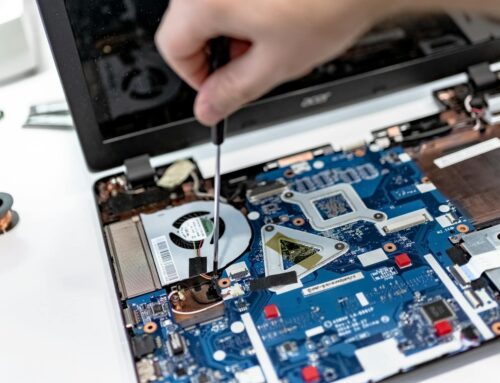
- Waiting through multiple days with a broken laptop or desktop can cause more harm if the issue is hardware-related. Loose connections or failure inside drives can worsen the longer they go unchecked.
- If you try to keep using a machine that’s already overheating or misbehaving, there’s a risk of serious data loss or new faults building on top of the original one.
We’ve seen plenty of cases when someone thought it was a small glitch and ended up losing important files or damaging a hard drive that kept trying to power through a fault. Sometimes, doing nothing is better than trying to push through it.
How to Manage While You Wait
If you have to hold off on repair or support due to the holiday schedule, there are ways to manage safely during the wait.
- Avoid pressing the power button again and again if your screen is black. Forcing restarts, especially over and over, can interfere with how the internal components respond later.
- If you smell anything burning or see sparks, turn off the power at the wall and leave the computer unplugged. That kind of reaction usually means a short circuit or internal damage, and continuing to use the machine can worsen it.
- If your PC still runs, back up what you can to an external drive. Use this time to save what’s important so you don’t risk file loss in case the machine crashes later. It’s always better to act when the system still boots.
Knowing when to let the machine sit and when to try carefully saving files can make all the difference.
When It’s Time to Have It Looked At
Some signs show up again and again, even after you try basic checks. That usually means the issue is beyond what can be fixed at home.
- If the same error message keeps appearing after every reboot or login, there may be software corruption or failing parts inside that need inspection.
- If you depend on your device for work or school, and you’ve restarted it only to find nothing improves, then you’re likely past the point of waiting.
- PCs that run hot even when idle are showing signs that internal cooling systems might be failing. If the fan starts sounding strange or louder than it used to, something is off inside.
These are moments where waiting longer might risk more than just inconvenience. When what’s on the machine matters, it’s better to stop using it until someone can check what’s going on.
Staying Ahead of Tech Troubles During Spring Holidays
Easter weekend often marks the first slow stretch after months of packed schedules and winter routines. That quiet space sometimes gives people a chance to finally notice problems that have been building for a while. And when it comes to tech, small problems left unchecked can turn into bigger ones quickly.
A fan that’s a little noisy now might stop working altogether in a few days. A machine that takes longer to boot could be trying to alert you something’s about to fail. Planning ahead, like creating backups and knowing signal signs early, can save you loads of stress. If something doesn’t seem right, take note of what you see and hear, keep the machine powered off if needed, and aim to get help as soon as holiday hours allow. That way, you’re not stuck making hard decisions when it’s already too late.
Easter can be a turning point for your tech, and if your setup is still acting up, delaying repairs might lead to bigger headaches down the road. Whether you’re dealing with persistent software glitches or hardware woes, our team is here to help with quality PC repair in London throughout the holiday season and beyond. At Forest City Computer Repairs, we’re ready to get your system running smoothly again, just give us a call when you want a proper solution.