MacBook Pro laptops are known for being fast, quiet, and reliable. But when problems start showing up, most of us don’t jump to get help right away. That’s especially true when the issue seems small. You might put it off, expecting it to go away. Still, in winter, it’s more important than ever to keep your laptop working well, especially with work routines restarting and students heading back to classes.
A machine that freezes, drains quickly, or won’t charge properly can throw off your entire routine. Slower performance or strange sounds are often signs that something’s building under the surface. Knowing when it’s time to look into an Apple MacBook Pro repair service can help you avoid bigger issues and save your files, and your patience.
How MacBook Pro Issues Usually Start
The first signs of a MacBook problem rarely feel like an emergency. That’s what makes them easy to brush off. You might notice your applications taking longer to open, or your battery starting to die faster than it used to. Some see the spinning beachball appear more often, while others hear the fan kick into overdrive for no clear reason.
Small as these things seem, they often mean a system is struggling. Many users assume these are natural signs of age. While wear over time is normal, certain patterns point to bigger problems. For example, if your Mac was smooth-running for years but recently started slowing down a lot, something behind the scenes may not be working right.
What feels like simple lag or heating might be caused by changes in your battery health, hard drive performance, or outdated parts. Over time, these signs can get worse. The sooner you pay attention to them, the easier it is to get things fixed without a larger repair down the road.
When Winter Conditions Make Problems Worse
Cold weather brings out weaknesses in electronics, and London, Ontario winters come with enough temperature drops to make that a real concern. If your MacBook Pro has a battery issue or an aging screen, you’ll notice these problems more clearly in January.
One example is when a battery loses charge suddenly or doesn’t hold as long as normal, especially after being out in the cold. Leaving your laptop in a car, even for a short time, can put a lot of stress on its internal parts. A chilled Mac might take longer to start, or it could show glitches as it warms up.
Winter dryness can also lead to static shocks, which sometimes affect ports and charging connections. If you plug in your charger and nothing happens, or you notice that your keyboard or trackpad works differently, it could be more than just a glitch. These are signs worth watching closely, as cold-related damage can make everyday use frustrating fast.
Which Symptoms Signal It’s Time for a Repair Service
Not every issue calls for immediate help. Still, there are a few red flags that shouldn’t be ignored. If your MacBook starts shutting down by itself with no warning, that’s a clear sign something’s off. Unexpected restarts can point to hardware or overheating problems that may not fix themselves.
Battery issues can go beyond slow charging. If your Mac only works when plugged in or dies as soon as you disconnect it, that’s something that needs to be checked. Sometimes it’s the battery, other times it’s the charging port or power circuit.
Other problems worth paying attention to include:
• A flickering display when you move the screen
• Keyboard keys that lag, repeat, or stop responding
• A trackpad that freezes or jumps around
If these feel like daily hiccups, it’s easy to brush them aside. But if they keep happening, it’s usually a matter of time before they get worse or affect other parts of the system.
Why Catching It Early Matters with Apple MacBook Pro Laptops
Trying to work around a problem can seem easier than taking time to figure it out. But MacBook issues have a habit of spreading if they’re left alone. What starts as reduced battery life might become a swollen battery affecting your trackpad, or a flickering screen might lead to tougher graphic display errors.
Getting help early keeps things from reaching that point. It’s cheaper and simpler to replace a worn-out cable or trackpad than deal with damage caused by overheating or power leaks. We often see small repairs delay or even prevent the need for major replacements later.
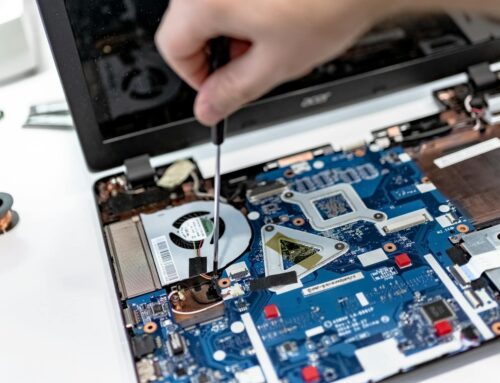
When you take your machine to an Apple MacBook Pro repair service, the checks go deeper than just the surface issue. That means problems you haven’t noticed yet can be handled early, giving your Mac a longer and more stable life. Catching those signs early saves time, money, and stress.
Using Expert Diagnostics for MacBook Pro Repairs
Being able to quickly identify the root of a MacBook issue can make all the difference. At Forest City Computer Repairs, we rely on specialist diagnostic tools approved for Apple devices, which helps pinpoint whether a problem lies with the battery, logic board, or display. Our approach matches what’s highlighted on our website, we focus on clear troubleshooting and thorough checks so nothing gets missed. For both Intel and M1 Apple MacBook Pro models, our assessments are based on up-to-date repair standards.
We understand that every device is unique. Sometimes, a MacBook arrives after liquid exposure or years of daily use, and we make sure every check is adjusted for that history. This way, we don’t just chase symptoms, we get to the root cause.
A Smarter Way to Keep Your MacBook Pro Running
Your MacBook doesn’t have to crash completely before it needs attention. When typing feels awkward, your screen gets fuzzy, or it just feels slower overall, trust your gut, something probably needs repair.
Winter in London, Ontario adds extra pressure on electronics. Cold air affects batteries, movement in and out of buildings causes condensation, and heavy use during school or work catch-up can push a worn-out laptop over the edge.
• Watch how your Mac acts in different settings, warm rooms, cold cars, or while charging
• Keep an eye out for charges that don’t last, apps that freeze, or signs of overheating
• Trust that small problems can point to bigger ones behind the scenes
If something’s not working right, odds are it’s not going to fix itself. Problems like failing parts or connection damage tend to grow over time. Paying attention early can save you from major headaches later in the season.
Ready to Get Your MacBook Pro Back on Track?
Experiencing issues with your MacBook can be frustrating, especially when the colder weather in London, Ontario, puts extra stress on your hardware. At Forest City Computer Repairs, we’re here to provide reliable and fast support, whether you’re dealing with a faulty battery, display problems, or a finicky trackpad. Count on us for fast, careful help with any kind of Apple MacBook Pro repair service. Give us a call today to see how we can get your device back to its best.