Sticky MacBook keys are one of those things that seem small at first but can really get under your skin, especially when you’re mid-task and certain letters just won’t register. We see it often as winter wraps up in places like London, Ontario. After months spent indoors, crumbs from a snack, dust from heating vents, or carry-in grit from gloves all have a way of making their way into those slim key crevices.
MacBook repair in London, Ontario tends to rise around this time of year, not just because of cold season wear but also because people start to notice minor annoyances that have slowly built up. If your keyboard has started to feel stiff or off, it’s not just you. That sticky feeling usually means something’s going on beneath the surface.
Why MacBook Keys Start Sticking
There’s no mystery to it, MacBooks are used heavily every day, and wherever we go, they go too. It doesn’t take long for materials to work their way into the keyboard.
- Everyday use builds up skin oils, dust, and little bits of food inside and around the keys. Over time, this grime settles beneath the caps and makes key movement uneven.
- Small spills like a splash of coffee or placing your laptop in a humid area can leave behind residue. Even tiny amounts can affect how the keyboard feels or works.
- During winter, when people tend to use their devices indoors much more, keys see heavier and more repeated tapping. Combined with dry air and heat from radiators, this accelerates how fast certain keys get tired or stuck.
More often than not, what seems like one slow key is actually a buildup of stuff underneath or a sign of wear across more than one key. The longer it goes unchecked, the worse it gets.
Signs You Shouldn’t Ignore
When problems start on the keyboard, they usually show up in small ways. Most people spot them and hope they go away, but with sticky keys, they rarely do.
- Keys feel soft or pressed in and don’t spring back up like usual.
- It takes more than one tap before a letter shows up on screen, or letters double up unexpectedly.
- Typing starts to sound odd, clicks and scrapes where it used to be quiet and smooth.
- One bad key turns into a cluster of nearby keys acting the same way.
If this sounds familiar, it’s a good reason to stop and have the keyboard checked before more damage is done. Waiting too long can make the fix more involved, especially if things start spreading along the row or column.
What Makes MacBook Keyboards More Sensitive
MacBook designs have changed over the years, and while they look clean and modern, that slim style comes with downsides when it comes to keys.
- Most newer models use thin switches and layers under each key, which are more easily affected by dirt, dust, or moisture than chunkier keyboards of the past.
- Every key has small parts seated closely together, leaving very little room for type errors caused by trapped material. Once something finds its way in, it stays there.
- Because of how the keys are connected, one sticky key can affect how well others work nearby. Pressing one can press down the next, especially if things start getting misaligned.
This tighter layout makes the keyboard more responsive when it’s clean, but also causes more problems when anything gets inside. Even the smallest particle can feel like a block when typing.
The Smart Time to Get Help
Now is actually a good moment to act. Late winter in places like London, Ontario often means laptops have been through heating systems drying out the air and raised usage from the holidays or school term.
- That long stretch of indoor use makes it more likely for crumbs, pet hair, or small debris to get stuck under keys.
- If caught now, many of these keyboard issues can be treated with a deep clean or key reseating rather than needing full part replacements.
- The risk of spring humidity mixing with dusty internals can lead to issues beyond the keyboard, like trackpad glitches or battery behavior changes.
There’s a small window of time before spring brings even more moisture into homes and into machines. Acting now means you’re less likely to face bigger complications later.
Why a Careful Check Matters
Repairs aren’t just about making the sticky key stop sticking. They’re a chance to find out what’s going on inside the whole keyboard setup.
- A proper check will test the travel time and response of each key, not just the ones feeling off.
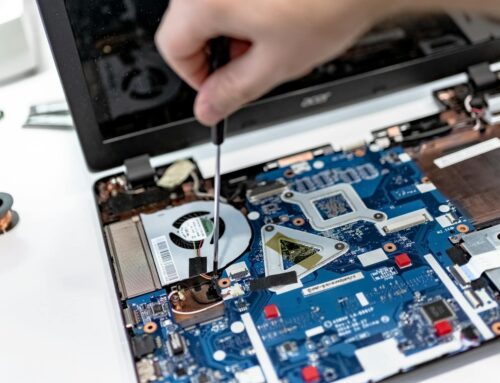
- Internal cleaning looks far beyond the surface, clearing out bits from around fans, ports, and even under the trackpad where liquid sometimes trails.
- We often find early signs of mechanical wear or heat damage around the keyboard that might not show up yet, but could soon become real problems.
The smaller the issue looks on the outside, the more likely it’s hiding something underneath. A hands-on check makes sure that follow-up problems don’t catch you off guard right when you need your MacBook most.
Keep Your MacBook Typing Smooth as Spring Arrives
It’s easy to ignore a key that just feels a little off. Most people hit the spacebar harder, tap the S key twice, or jiggle the Q until it works. But those little things can point to early signs of breakdown. As we head into spring, moisture levels rise again and laptops that didn’t get a winter checkup often develop problems right when you least expect it.
Sticky keys may not seem urgent, but they rarely fix themselves. Addressing them early saves you time, mess, and interruptions later on. Especially if you’re working or studying from home in London, Ontario, a smooth keyboard can make all the difference over the coming months.
Sticky keys or sluggish performance can make your day more difficult, so don’t let small keyboard issues turn into larger headaches. If your laptop has spent the winter indoors and is now showing signs of trouble, Forest City Computer Repairs is ready to help. See how we approach MacBook repair in London, Ontario. Contact us when you’re ready to get your device checked and running smoothly again.